
Unplug the network and the window still opens — that is the whole design in one test
A seller leaves a desktop in the corner of the house, powered on, thirty product links pasted in, and goes to bed. In the morning there is a batch of videos.
Now unplug the network and open the app again: the window still loads, the library still lists the old videos, the jobs that were waiting are still sitting where they were. Only the parts that need the internet stop — pulling footage in, calling a model, posting, checking the licence.
That is not a feature somebody added. It falls out of one decision: everything that belongs to the work lives on your disk, and the internet is only where raw material comes from and finished files go.
Six things sit on the machine, and exactly one of them holds the truth
Name them one at a time, because most misunderstandings about this system come from assuming there is a server somewhere holding the state for you.
- The interface. A page in your browser, served by the application process itself. It collects choices, calls downwards, and redraws a state it reads back from the data file. Closing the tab loses no job.
- The orchestrator, written in Python. It owns the order of the steps, the retry counts, the checks, and every call that leaves the machine. This is the only part that decides anything.
- The engines. Four voice engines: two run over the network, two run on the machine itself, and the default one needs no key at all. Building the picture and drawing the subtitles happen in the same process, with the heavy lifting handed to the video tool underneath.
- One data file. Jobs, per-step state, the library of finished videos, the transcripts already read, the posting schedule — all of it in one file, plus its journal file beside it.
- The licence guard. It reads a signed token on disk, checks it against a public key shipped inside the install, and answers yes or no before any heavy work starts.
- The Telegram bot. A second process on the same machine, reading the same data file. No token, no thread: an app with no bot does not wake up every second to stare at an empty table.
- Your Chrome. A real window on the machine with a screen, used for exactly two things: reading Douyin and posting to Shopee.
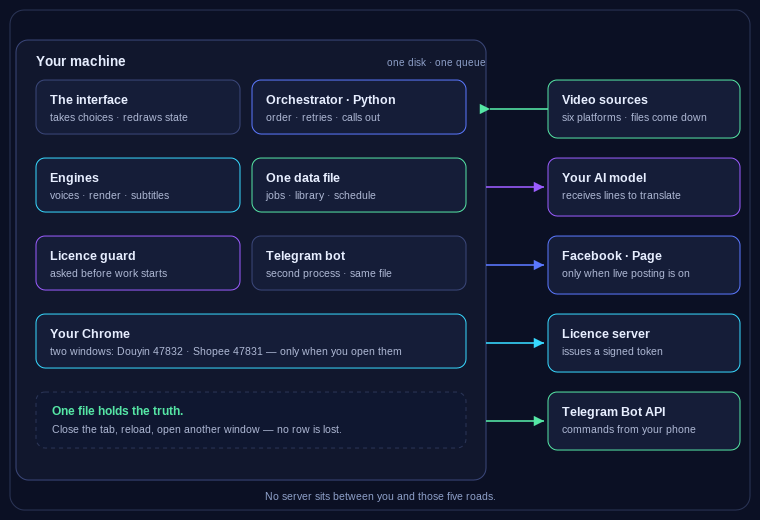
Those six things share one disk, one graphics card and one queue. That is why the number of jobs running at once is decided by the machine rather than picked by you: the app reads its own core count and free memory, then sets its own ceiling.
A request passes through five places and is written down exactly once
Press the button, and this is the route one job takes.
- The interface collects the choices and calls down into the orchestrator. Nothing is decided here, including whether the job runs at all.
- The orchestrator asks the licence guard first. No licence for this kind of work and it stops before writing anything — cheaper here than ten minutes into a render.
- Every video in the batch becomes its own row: input, language, voice, status waiting, step 0 of 5. The row is written before a single frame exists.
- A bounded pool of workers picks those rows up. Each job runs five steps: read the speech, translate, generate the voice, build the picture, attach the metadata. Progress is written every two seconds, and immediately when a job ends, however it ends.
- The output path and a row in the library are written. The screen redraws by reading that row, not by remembering which button you pressed.
Only steps three and five write the truth. The progress bar, the running list, the message on your phone — all of them read back from it.
What that buys in practice: reloading the page mid-run loses nothing, opening the app in another window shows the same batch, and a job cut off halfway still has a row you can read. It does not vanish, and it does not quietly restart behind your back.
Five roads to the internet, and every one of them sits behind a choice you made
"Runs locally" is an easy thing to overstate. Counted honestly, there are five roads, not fewer.
- The road into the source platforms. The link you paste decides where it goes: YouTube, TikTok, Douyin, Bilibili, Hongguoduanju, iQiyi. This one runs both ways — ask the page first, download the file after.
- The road to the language model. The key and the address you enter decide who reads your lines. The default is an OpenAI-compatible service; changing supplier is two fields, not a reinstall.
- The road to Facebook. It only opens when you connect a Page and turn live posting on; the default is a dry run that writes a fake post id and sends nothing. When it is live, the file goes up to Facebook’s upload host and the app waits for the publish status, for up to 300 seconds.
- The road to the licence server. One domain. It takes an activation key and a machine id and returns a signed token; later calls only renew that token.
- The road to Telegram. Only there when a bot token is entered. The bot asks for messages continuously, which makes it the one road that is busy while you are not touching the machine.
There is no sixth road: no usage figures sent anywhere, no hidden reporting, no account sitting between you and the platforms.
What stays inside is part of the design too
The list of things that stay is shorter and matters more: the data file, the finished videos, the library, the Shopee session and the Chrome profile, the licence token, the fonts and the templates.
A video file does not pass through anybody’s server. When you post, it goes from your machine to Facebook, or through the Chrome window to Shopee.
The spoken lines are the exception, and it is worth saying plainly: when you translate or write a script, each line goes to the model you chose. That is still road two, not a new one — but it does mean the text leaves the machine while the video does not.
Backups follow the same rule. Copy the data file and the journal file beside it, and you are done; there is no remote database to sync, so there is no copy of your work you do not control.
The licence check sits where work starts, not where the button is
A fence drawn in the interface is a fence the bot, the command-line tool and the automation tools all walk straight past, because none of them renders a screen. So the check sits in two places: when a batch is accepted, and when a post is sent.
Enforcement is on by default. The token carries its own expiry and is signed with Ed25519, and the public key ships inside the install — so a machine that has never been online can still verify it. A few days offline and it keeps working; past the token’s expiry it stops and says why.
Changing the system clock does not rescue anybody: the expiry is inside the signature and is measured against the server’s clock. Winding the clock back works once, for at most six hours, because the app remembers the latest time it has ever seen.
And a revocation has no grace period. Revoked, suspended, expired are final answers, quite unlike "the server could not be reached". Treating those two as the same thing is how a refunded licence keeps working for another three days.
Chrome is your window, and it opens when you open it
Two windows, two different ports: 47832 for Douyin, 47831 for Shopee. Not the familiar 9222, because that is the first port anti-fraud scripts probe; a port nobody uses says nothing about you.
When the app runs somewhere without a screen, it cannot open that window itself. You start it from a launcher on the machine with the screen, sign in once, and the app attaches to it. The window has to listen on every network address rather than just the local machine; otherwise requests from the app are refused with an error that reads exactly like "there is no browser here".
This is the one place in the architecture where safety depends on your habits rather than on code. Saying so out loud beats letting you find out later.
One machine means one point of failure, and nobody on call but you
Machine off, queue stopped. Disk full, the whole batch halts, usually at the heaviest step. A power cut at two in the morning has nobody to restart it for you, and there is no copy elsewhere to carry on from.
The trade back: no server bill, no minutes cap on rendering, and nothing leaving the machine except the five roads above. One desktop running overnight does the volume that a person editing by hand would not finish in a week.
Frequently asked questions
Does the app upload my videos to a server?
No. There is no middle server anywhere in a video file’s path. When you post, the file goes straight to Facebook, or to Shopee through the Chrome window on your machine. Text is the part that can travel — lines and scripts go to the model you configured, and that is the only way written content leaves the machine.
What still works with no network?
Opening the app, browsing the library, reading old jobs, editing settings and watching finished videos all work. The parts that need a network are fetching sources, calling a model, posting, and the licence check — and the licence keeps working until its token expires, so a few days offline blocks nothing.
Do I have to open a separate Chrome window?
Only for two things: reading Douyin and posting to Shopee. The app has its own browser, but a fresh profile carries no session, so Douyin answers it with a verification page. Your Chrome window carries the session, and that is the whole difference.
Is a desktop machine enough?
That is the machine it was designed for. Rendering is the heavy step, so the graphics card sets the speed; the app measures its own cores and free memory to choose how many jobs run at once, so a weaker machine runs fewer jobs rather than falling over.
Automate the repetitive part
AutoReel does most of what these articles describe: reads the product, writes the script, builds the video, then publishes it to Shopee Video and Facebook/Reels. Rent it from $6.99 a month, or buy it once and keep it.