
A queue in memory dies with the process, so this one is not kept in memory
The familiar arrangement: a list in memory and a loop pulling items off it. Fast, tidy, and gone the moment the process dies — not just the running job but every job that had not started, because none of them existed anywhere outside RAM.
Here it is the other way round: the row is on disk before a single frame is rendered. The first question to ask about any change to the queue is "if the power went now, what is left?".
The answer has to be: the row, with enough in it to read back what you asked for.
A batch is written as rows before the work begins
Press run and every video in the batch gets its own row: source link, target language, voice, speaking rate, captions or not, template, status waiting, step 0 of 5. The row is written before the worker pool is handed anything.
While a job runs, progress is written once every two seconds — writing after every translated sentence would turn the data file itself into the bottleneck. At the end, whether the job succeeded, failed or was cancelled, the write is immediate and does not wait for the tick.
That is the whole survival mechanism: nothing important exists only in memory. The progress bar can be smooth because it reads memory, but memory is only a fast copy of the row.
Opening the app again is a cleanup ritual, and the order is the important part
Before any worker is allowed to take work, the app walks this list.
- Jobs still marked running or waiting by the old process are marked failed, with the reason "interrupted by restart".
- Recap projects still running are paused rather than failed, because they keep checkpoints and resuming from one is far cheaper.
- History older than thirty days is pruned, and only rows that already ended can go.
- Telegram commands still marked running are failed; commands still waiting are left alone, because they never started and running one is not running it twice.
- Scheduled posts the dead process had claimed become interrupted, and old finished rows are pruned too.
- Only then do the loops start: one scheduling worker per platform, the licence refresh thread, the job pool, and the campaign orchestrator.
The order is not cosmetic. Cleaning before opening the door is the only way no worker sees a ghost row and picks it up.
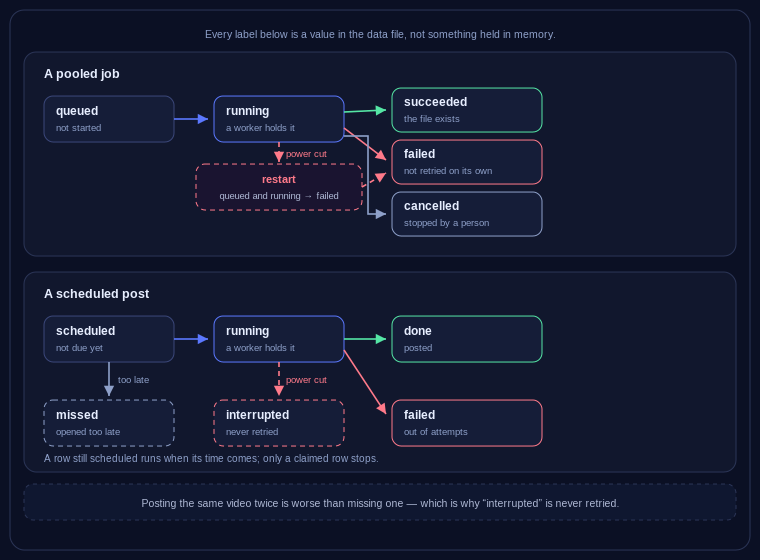
What survives is the row, not the step in flight
Worth saying plainly, because it is the disappointing part: a job that was rendering when the power went will not continue from frame one thousand. On the next launch its row reads failed. The step in flight is lost, and there is no intermediate state to attach to.
- What remains: what you asked for, the source link, language, voice, template, and the step it reached — enough to know where it died.
- What is lost: the work of the step in flight. Transcribing and rendering both start over if you run it again.
- What does not happen: the rerun. Nothing scans the failed rows and quietly tries again, because redoing work you did not ask for is its own kind of wrong.
For a manual batch the fix is to press again, and the old row tells you how far it got. A campaign is different: its work is broken into pieces that can be repeated, so the next pass picks up rather than starts over. The next section is about that difference.
A scheduled post outlives a job, so it has its own rules
A scheduled post is not a job running in the background. It is a row with two times: the time you chose, and the time it will actually be tried. The two differ all the time — the phone is off, another batch is running — so the chosen time is not the condition for running.
Each platform has its own worker, asking every twenty seconds. Taking a row is a conditional write: only a row still marked scheduled can become running, and the loser comes back for the next one. That is why two processes cannot post the same item.
If the app opens late, the post still runs when it opens within thirty minutes of your chosen time. Later than that it becomes missed — posting last night’s video this morning is worse than not posting it. If the phone is busy, it waits sixty seconds and tries again, up to ten times, and the attempt count lives in the row, so restarting during that wait does not reset the count.
The campaign loop ticks every minute, and "has today run yet" lives on disk
The orchestrator wakes once a minute. For every enabled campaign it measures how the posted videos are doing, pushes out anything due to publish, and only then considers making new content — and only when today has not run yet and the start time you set has passed.
The day marker is written only after a full cycle finishes. Die mid-cycle and the marker is not written, so the next launch tries that cycle again the same day. Trying again is safe because each piece knows what it already did: existing content is reused rather than duplicated, content already published is skipped, and content stuck in the creating state is treated as retryable because the process that wrote that state is gone.
The publish queue works the same way: each attempt is a conditional write, a failure is rescheduled five minutes later, twice, and only then filed as failed. Before publishing, the app asks one cheap question — has this content already gone to that Page? If it has, the answer is already published rather than a second upload.
Four queues, four vocabularies, and no status called an error
The words on screen are not decoration. Reading the right one tells you what to do next.
- Pooled jobs: waiting, running, done, failed, cancelled. An error is a column, not a status — a failed job can still carry a long explanation.
- Scheduled posts: scheduled, running, done, failed, interrupted, missed, cancelled. Interrupted and missed are not synonyms for failed: one says a process died while holding the row, the other says the app opened too late.
- Telegram commands: waiting, running, done, failed. A waiting command survives a restart; a running one does not.
- Campaign publish items: scheduled, publishing, done, failed, cancelled.
Folding interrupted into failed would teach you to retry exactly the case where retrying is wrong. That is why the tables keep their own vocabularies instead of sharing one status column.
A spinner after a crash is a lie, and the code knows it
Live state in memory is the screen’s shortcut: the running list is read from there every couple of seconds. After a restart that memory is empty. With nothing reconciled, a batch would either vanish or spin forever.
There are two fixes, and both rest on the row. The recent-batches list is rebuilt from the table, so reloading the page still shows the old batch. And a run still marked running while its process is gone is painted as needing attention rather than as moving — because a spinner is a claim nobody can verify.
There is exactly one place with no such cleanup step: the campaign publish queue. A row that was claimed and then lost its process stays marked publishing, and nothing resets it at startup. It is the one spot in this article where an abrupt shutdown can leave a mark that does not clear itself.
Three rules sit behind all of it
- Write before doing. No work starts before a row says what the work is.
- When in doubt, do it at most once. Publishing cannot be undone, so doubt stops and leaves it to a person.
- If it can be repeated, do not repeat it automatically. Rendering a video again is fine; posting it again is not. That is why a manual batch is not rerun, while campaign content is picked up piece by piece.
Frequently asked questions
What is lost if the machine dies mid-render?
The step in flight: a half-rendered video is not kept, so running it again starts that step over. What you asked for is not lost — the job row, source link, language, voice and the step it reached are all still there, and on the next launch that row is marked failed with the reason.
Why doesn’t a failed job retry itself?
Because redoing work you did not ask for is its own kind of wrong, and on some steps it could post something twice. The app records how far it got and leaves the decision to you. Campaign content is the exception: its work is broken into pieces that repeat safely, and each piece knows what it already did.
Does a scheduled post get missed if I open the app late?
It can, but there is a grace window. Open within thirty minutes of your chosen time and the post still runs; later than that the row becomes missed rather than posting yesterday’s video. If the phone is busy or another batch is running when the time arrives, it waits sixty seconds and retries, up to ten times.
Can I open two app windows at once?
Yes, and both read the same data file. Taking work is a conditional write, so two processes cannot claim the same row: the loser comes back for the next one. What you should not do is run two installs pointed at two different data files and assume they are one.
Automate the repetitive part
AutoReel does most of what these articles describe: reads the product, writes the script, builds the video, then publishes it to Shopee Video and Facebook/Reels. Rent it from $6.99 a month, or buy it once and keep it.