
A machine that loses the network at 2 a.m. still has videos to make
A small studio loses wifi halfway through a batch of 20 videos. If the software treats that as an error, the batch stops, and the person waiting does not know when it will start again.
Licensing here is built around that situation: a machine that has activated can check itself, without asking the server before every video. Being offline is a normal state, not a failure. This article covers the only four calls that leave the machine, a 72-hour limit that lives inside a signature, and the points where work is actually stopped.
Activation is one exchange of a key for a signature
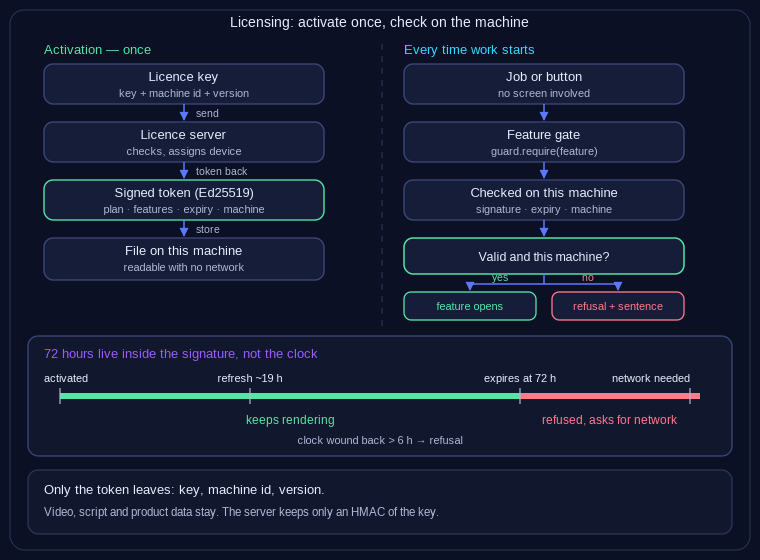
You enter a licence key once. The machine sends four things: the key, its own installation id, a device label so you can recognise the machine in a list, and the app version. The server returns a signed token, a credential for refreshing it, the plan you bought, and the time of the next check-in.
The token carries exactly what a decision on the machine needs: which product, which machine, which plan, which features, and when it expires. It carries no name, no video content, and nothing about what you sell.
The machine checks the signature itself, and does not ask the server again
Every check does four things in a fixed order. Split the token into three parts. Read the header and refuse if the algorithm is not EdDSA — the algorithm is pinned rather than read from the token, because a token that names its own algorithm is a token that can name “none”. Check the 64-byte signature against the public key. Only after the signature holds is the payload read. A payload whose signature has not been checked is just a string somebody else wrote.
The payload then faces its own checks: the right issuer, the right product, an expiry still in the future, the machine this token was issued to, and an issue time no more than five minutes ahead. Five minutes covers a clock nobody set; a token from next year means the clock was moved.
Results are kept per token, up to 8 of them. A batch of 200 jobs checks a signature once, not 200 times. Only verified results are cached, and every cache hit still compares the expiry, so the cache cannot stretch a token’s life.
The 72 hours live inside the token, not inside the machine clock
The server issues a token with a 72-hour limit, never beyond the licence’s own expiry. The token also carries a second time: when to come back. That time is a suggestion, not a limit — if the refresh fails, the token keeps working until the 72 hours run out.
The server schedules the next check-in 24 hours out, and the machine returns at 80 percent of that window, around 19 hours. It comes back early so that one failed network call does not become an expiry: there are still nearly five hours to try again before work stops.
Because the limit sits inside the signature, moving the machine clock buys nothing. Moving it forward does not extend the token; moving it back is noticed: the system records the highest time it has ever seen, in memory and on disk, and a rollback of more than six hours is refused. Comparing only against the in-memory mark would stop working after a restart — the first thing anyone winding the date back would do.
Six hours covers a wrong timezone, a daylight-saving change applied twice, or a clock sync after a machine has been off for a while. It is not enough to wind the date back and keep working for months. This is not an absolute wall; the owner of the machine still owns the clock. It only makes the cheat cost something: at most six hours, once.
What never leaves the machine
Only four calls go out: activate, refresh, deactivate, and ask for status. Their payloads hold the key, the machine id, the device label, the app version and the refresh credential. There is no video, no script, no product data, no job list, and no file name.
Put another way: the licence server knows what you are entitled to, not what you sell.
The server does not keep keys in readable form either. Licence keys and credentials are stored as HMAC-SHA256 with a pepper; the pepper lives in the server’s secrets, not in the database. A stolen database copy does not turn into a list of usable keys. Comparisons run in constant time, so the response time does not reveal which part of a key was right.
On your machine, the licence file is written through a temp file and a rename, with mode 0600, in a directory that is not served over HTTP. A half-written file after a power cut is not repairable — it has to be reissued, while the customer is on the phone.
The gate sits where work starts, not on a screen
A gate drawn on a screen is a gate the agent, the Telegram bot and outside tools walk straight past, because they never draw a screen. Three screens even open one another through handlers rather than clicks. So the check lives where work actually starts: when a batch is queued, when a posting run begins, when a logo-removal job is created.
Hiding a sidebar entry is presentation. It is not a door, and the system does not pretend it is one.
Each check takes one feature code, or a pair of codes. The code must be in the token’s list. The pair exists for a plan bought before a new code was introduced: a feature that was renamed still opens its old screen, instead of disappearing while the customer waits for a token refresh. A code this build does not know is ignored rather than passed along — the server may learn a feature before this build does, and forwarding an unknown code would turn a typo into a permission.
The same check serves screens, the agent, the bot and outside tools. There is no second way in.
When a check fails, it says one sentence, not a stack trace
A refusal is not a crash. The sentence is written for the person at the machine: your plan does not include this feature, the licence has expired, the licence is suspended, the token has expired and a network connection is needed to refresh it.
Each sentence carries a hint. No traceback and no bare error code on screen. The user needs to know what to do, not which exception was thrown.
When the network is gone, a failed refresh is recorded but does not block the work in progress. Only an expired token makes the gate refuse, and that refusal names the actual fix: connect to the network to refresh. One outage in the morning does not ruin the working day.
There is one important exception: a definite refusal from the server — revoked, suspended, expired — outranks whatever offline time is left. The token still has a valid signature, but its owner has said no. That record is kept on disk and in memory, so making the licence file unwritable cannot erase a revocation. The memory copy lasts only until the next restart, but that is a far smaller hole than “no effect until the customer gives up”.
The public key ships with the build, and rotation needs an endorsement
Signatures are checked against a public key baked into the build. That is what lets a machine that has never been online verify a token at all. A public key is not a secret, so shipping it is not a risk.
New keys are published in a public document, and that document is trusted only when an existing key has signed for it. Before this check existed, a fake server could publish its own key and every install would believe it — the baked key was present but never consulted.
A downloaded key is never written to disk. A key in a file the machine’s owner can edit is no longer an anchor. The key document is also fetched at most once every 24 hours, so one failed fetch does not open a window that never checks again.
Rotation is therefore an operator’s job, not the build’s: the old key signs for the new one, and every machine trusts it on the next check.
Four things this system does not do
- It is not DRM. Somebody determined to patch the build will patch it; what it stops is casual key sharing and running on more machines than bought, not a single reverse engineer.
- It does not call the server before every video. The gate reads a file and a signature on the machine; only a due refresh makes a call.
- It does not stop a video that is already rendering. The gate blocks the next piece of work from starting; the one in flight finishes.
- It does not keep your data for reports. The server sees only what is in those four calls.
Four questions worth asking any licensing system
- What happens offline? If the answer is “it stops working”, the system ties your work to somebody else’s connection.
- What does it send? If the answer is not limited to a key, a machine id and a version, you are paying to let someone read your data.
- When does a revocation take effect? If it keeps running for 72 hours after revocation, that is a grace period, not a revocation.
- Does changing the clock buy time? If it does, the limit is decoration.
Frequently asked questions
What happens after more than 72 hours offline?
New work is refused with a message saying the token has expired and a connection is needed to refresh it. The licence is not lost: one session online gets a fresh token and work continues. A render already running finishes.
Can one key be used on several machines?
No. The token is issued for a specific machine id, so moving it to another machine fails with an installation-mismatch error. The number of machines is part of the plan, and deactivating returns the slot.
Does the licence server see my videos?
No. The four calls carry only the key, the machine id, the device label, the app version and the credential. No file, script, product data or job list ever goes out.
Can I turn the licence check off?
Only on a development machine or a support session, through a dedicated environment variable. A customer install has enforcement on by default; switching it off is not a setting on the screen.
Automate the repetitive part
AutoReel does most of what these articles describe: reads the product, writes the script, builds the video, then publishes it to Shopee Video and Facebook/Reels. Rent it from $6.99 a month, or buy it once and keep it.