
No feature of this software is locked behind a spec. An old four-core desktop with 8 GB of RAM can still remove a logo, dub a voice, cut highlights and build a video — nothing is missing.
The only thing the machine changes is how many jobs run at once. That is the one question worth spending more money on.
A weak machine loses no features, it just queues longer
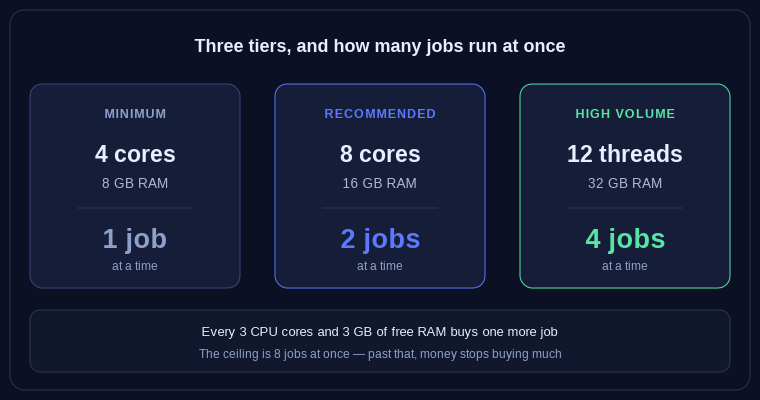
Work goes into a queue and runs several jobs at a time. How many run at once comes out of this rule: every 3 CPU cores buys one job, every 3 GB of free RAM buys another, and the ceiling is 8.
- 4 cores, 8 GB: one job at a time. Everything works, each job waits for the one before it.
- 8 cores, 16 GB: two jobs at once. This is the tier I would recommend to anyone working on it daily.
- 12 threads, 32 GB: four jobs at once — the measured sweet spot, and past it the money stops buying much.
Double the jobs does not give you double the output
Measured on eight short clips per batch, changing exactly one thing — how many jobs run at once: two jobs produced 7.35 videos a minute, four jobs produced 8.84. Doubling the jobs bought about 20% more output.
So if you make a few short videos a day, a mid-range machine is not your problem. The gap only matters when you run dozens of videos in one batch, or make long videos with many scenes — those jobs are heavier and the queue is longer.
RAM is the part people buy too little of
Across 67 jobs back to back, the whole system peaked at 4.2 GB of RAM. That sounds like 8 GB is plenty, but that figure is the video work — it does not count the operating system, the browser you have open, or the platform layer that takes its share before the first job starts.
Disk: 15 GB to install, and a separate budget for the videos you make
The installer wants about 15 GB free, most of it the application image and the voice model downloaded on the first run. That is what it takes to install and run — not what it takes to work for months.
- The Vietnamese voice model: about 0.9 GB, downloaded once.
- The speech-recognition model behind subtitles and highlight cutting: about 0.2 GB.
- The logo remover: about 70 MB, which is nothing.
- The videos you make: this is the big one. A machine a few weeks into regular use can be holding 17 GB of them.
Set aside 60 GB or more if you work at this regularly, and put it on a solid-state drive. A full disk is the most common failure once you have been running for a while, and it shows up as a video that fails to build rather than as a message saying the disk is full — so you go looking for a software bug in the wrong place.
Graphics card: nice to have, and no reason to buy a machine for it
A graphics card is not a requirement, and nobody should sell you one on the strength of this software. The rendering stage has a path that uses the card, but no feature only works when a card is present.
- Integrated graphics: runs normally, slower at the rendering stage.
- A dedicated card: clearly faster at rendering, especially with several jobs at once.
- If you do buy one, an ordinary 6 GB card is enough. This software does not need a powerful card, only a present one.
- Keep the driver current. A good card on an old driver quietly falls back to the processor, and nothing tells you it happened.
Why I would buy Windows
The software runs on Windows and on macOS, and on a Mac it runs the build made for that machine’s chip rather than emulating — so this is not about speed. The difference is one job: pairing an Android phone to post to Shopee Video.
- Windows 10/11: all of it, with no exceptions. This is what I would buy, and what most people doing this work already run.
- An Intel Mac: also all of it, same as Windows.
- An Apple Silicon Mac: fast and fine, but wireless phone pairing is off the table. If you never post to Shopee Video, that costs you nothing.
What to have ready before you install
- Free space: 15 GB to install, and 60 GB is the honest number if you plan to use it regularly.
- A free background application the software runs inside, installed once. The install guide names it and links to it — on Windows there is a second piece that goes with it.
- An Android phone, only if you intend to post to Shopee Video. Facebook publishes through a Page, so it needs no phone.
After that, leave the machine on. The first install pulls about 8 GB, so it takes a while — tens of minutes depending on your connection. After that you only need the network to publish, or when you have AI write the script.
An old machine still works, just more slowly, so do not buy a new one because of this article. And if you are still unsure, ask before you pay rather than guessing.
Frequently asked questions
Will it run on a machine with 8 GB of RAM?
Yes. That is the real minimum, and at that level it runs one job at a time with every feature available. What you lose is waiting time, not features.
Do I need a dedicated graphics card?
No. A dedicated card makes rendering faster, but every feature has a path that runs on the processor. If you do buy one, an ordinary 6 GB card is enough — and keep the driver up to date.
Does it run on an Apple Silicon Mac?
It does, and it runs the build made for that chip rather than emulating, so it is not slow. One thing does not work: pairing an Android phone over Wi-Fi to post to Shopee Video. Work around it with a single USB cable, or pair on a Windows machine.
How much free disk space does it need?
About 15 GB to install. Set aside 60 GB if you work at this regularly — the videos you make take up room faster than you expect, and a machine a few weeks in can already be holding 17 GB of them.
Is there a way to go faster on a weak machine?
Two: run fewer jobs at once so the machine is not dividing its strength, and leave the heavy work for hours when you are not using it. The third is more RAM — that is the upgrade to make before a graphics card.
Automate the repetitive part
AutoReel does most of what these articles describe: reads the product, writes the script, builds the video, then publishes it to Shopee Video and Facebook/Reels. Rent it from $6.99 a month, or buy it once and keep it.