
Two different rhythms should not share one process
A sales video takes a few minutes to render. For those minutes the hardware is almost fully occupied: the processor runs flat out, memory grows with every frame, the disk reads and writes at the same time.
If the window shares a process with that work, then the exact moment you press the button is the busiest moment the machine has — and what you see is a frozen window.
The real problem is not speed, it is how far a failure spreads
Nobody calls a frozen window a bug, but it is one. A user reads a frozen interface as a broken one. They click again, close it, open it again — while the software is running correctly and nothing at all is wrong.
The worse problem is elsewhere. Say the render step hits a corrupt source file and stops. If everything lives in one process, what stops is not one video — it is the whole program.
You lose the list of thirty queued jobs, you lose the state of every one of them, and you start again from nothing. One bad file on one video took the entire batch down.
Split them and the damage shrinks to a single job. The render process dies on that file, the orchestrator marks that job as failed and moves on to the next one. The window never needs to know what happened, beyond one status line changing colour.
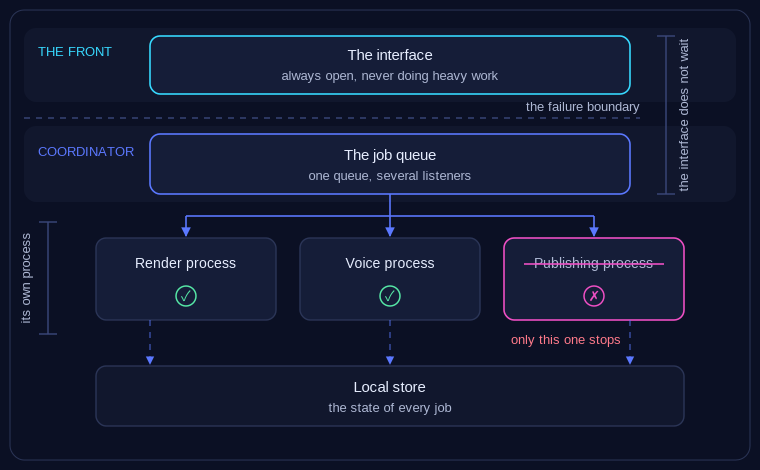
Three failure boundaries, all placed where things break for outside reasons
- Between the window and the orchestrator: the window holds no real job state. It only redraws the state that was already written to disk, so closing it and opening it again loses nothing and corrupts nothing.
- Between the orchestrator and each job: every job runs in its own process, with a maximum wait and a retry count. One stuck job does not hold a place in the queue for everything else.
- Between each job and the hardware: the heaviest step runs alone, sharing neither graphics card nor disk with another job. Slightly slower when there is only one job, but you never get two jobs fighting over the same resource and both failing.
Those three boundaries sit exactly where failure arrives from outside: the network drops, a platform refuses, a downloaded source file turns out to be broken. You do not control any of that, so the only thing left is to limit the damage when it happens.
The queue is the system’s memory, not a pretty waiting list
A queue is usually read as a tidy list of things waiting. Its real job is memory: it is the only thing that knows where the whole batch stands, which jobs are waiting, which are running, which are done.
Because state is written to disk the moment a job changes, the queue survives the things nobody plans for: the power goes, the user shuts the machine down halfway, the operating system kills a process.
Open it again and it reads the state back and knows exactly where to continue. A job caught mid-flight runs again; a job already finished is never redone.
Separate processes cost you five things
No architecture decision is free, and separating processes is no exception. The cost is real, and worth saying plainly:
- One more handover. Every job goes through the queue instead of being called directly, so there is a small delay at the start and the end of each job.
- State has to be written to disk properly. The window cannot ask a running process "are you done yet", so every change has to be recorded — and the reading side has to cope with seeing state that is one beat behind reality.
- Debugging is harder. A bug that lives on the boundary between two processes is visible from neither side; you log at both ends and compare, instead of reading one error line in a stack trace.
- More things to install. The window and the renderer share no libraries, so every release means checking versions twice — and if one side drifts, both need fixing.
- Slower for small jobs. For a three-second video, the cost of starting a process is bigger than the work itself.
One process is enough when the tool finishes and exits
If you are writing a tool that renders one video and quits, separating processes only makes everything more complicated. A failure boundary earns its keep when the run is long, when many jobs run one after another, and when the user needs to see progress while waiting.
All three are true of a batch of sales videos. Twenty videos overnight is long enough for anything to happen, and long enough that you do not want a single error wiping out the work. That is why the architecture was chosen — not because it sounds more modern.
A simpler way to remember it: separating processes does not make software faster. It makes software survive things going wrong — and in a pipeline that runs for hours, surviving matters more than peak speed.
Frequently asked questions
Does separating processes make my machine work harder?
Not noticeably. The big resource is still rendering, and it takes nearly everything whether it runs together or apart. What you add is a few waiting processes, worth tens to hundreds of megabytes of memory.
If I close the window while a video is rendering, do I lose the job?
No. The job keeps running and its state is already written down. Open the window again and you see exactly where it got to. If the whole machine goes down instead, the job in flight runs again next time you open it.
Does one failed video stop the whole batch?
No. Each job runs independently and is marked failed on its own, with a reason. You re-run that one, and everything else finishes normally.
Why not run several processes at once to go faster?
Because the machine has finite resources and the heaviest step cannot be split. Running more jobs at once only makes each one slower and raises the chance of failure. How many run side by side depends on your machine, not on how much you would like.
Automate the repetitive part
AutoReel does most of what these articles describe: reads the product, writes the script, builds the video, then publishes it to Shopee Video and Facebook/Reels. Rent it from $6.99 a month, or buy it once and keep it.