
Activating your licence
You were given a key in the form AR-XXXX-XXXX-XXXX-XXXX when you bought. Enter it once, and only once.
What happens before you activate
The app runs normally. With no key you can try it, render videos, open every screen — nothing is locked. The software only starts checking a licence from the moment you activate one.
Entering the key
-
Open Settings
In the sidebar, the last group, Cấu hình — the gear icon. (The interface is in Vietnamese; the gear is the same either way.) -
Scroll to the bottom
The Bản quyền section is last, below the phone pairing block. -
Paste the key and press Activate
Paste into Mã kích hoạt and press the Kích hoạt button beside it. It takes a second or two.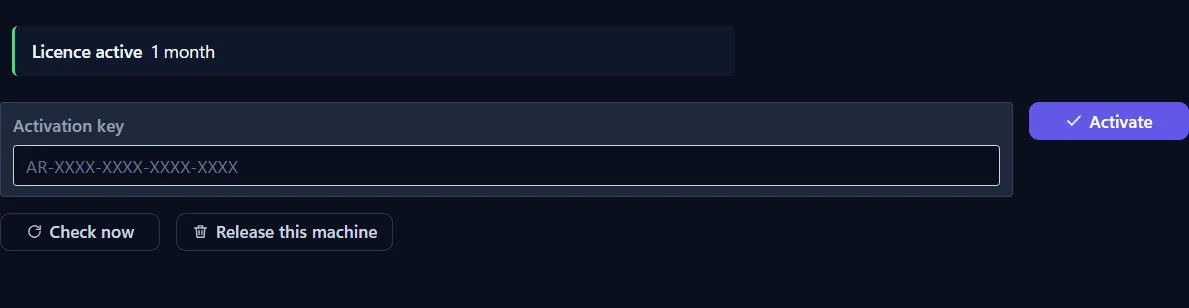
Paste the key, press Activate. The line above changes from "Not activated" to "Licence active".
The status line changes to Bản quyền đang hoạt động ("licence active") with the days remaining. If it still says "Chưa kích hoạt", the key did not arrive — paste it again.
A key belongs to one machine
The key is bound to your machine when it is activated. That machine needs a connection once every few days so the app can check back.
- With no connection the app keeps working for 72 hours. Past that it needs the network again.
- Renewing: the licence section warns you before it expires. Renew, then press Kiểm tra ngay ("check now") — there is nothing to reinstall.
- A new machine, or a reinstalled operating system: you need a new key. Contact whoever sold it to you; they release the old machine and issue another.
- Releasing a machine: the Gỡ máy này button in the same section, for moving a key to another machine without waiting.
A revoked or suspended licence does not wait out those 72 hours — both take effect at the next check.