
Posting to Shopee
Posting happens on a real phone, through the Shopee app — there is no API for it. The computer drives the phone; your part is leaving it alone.
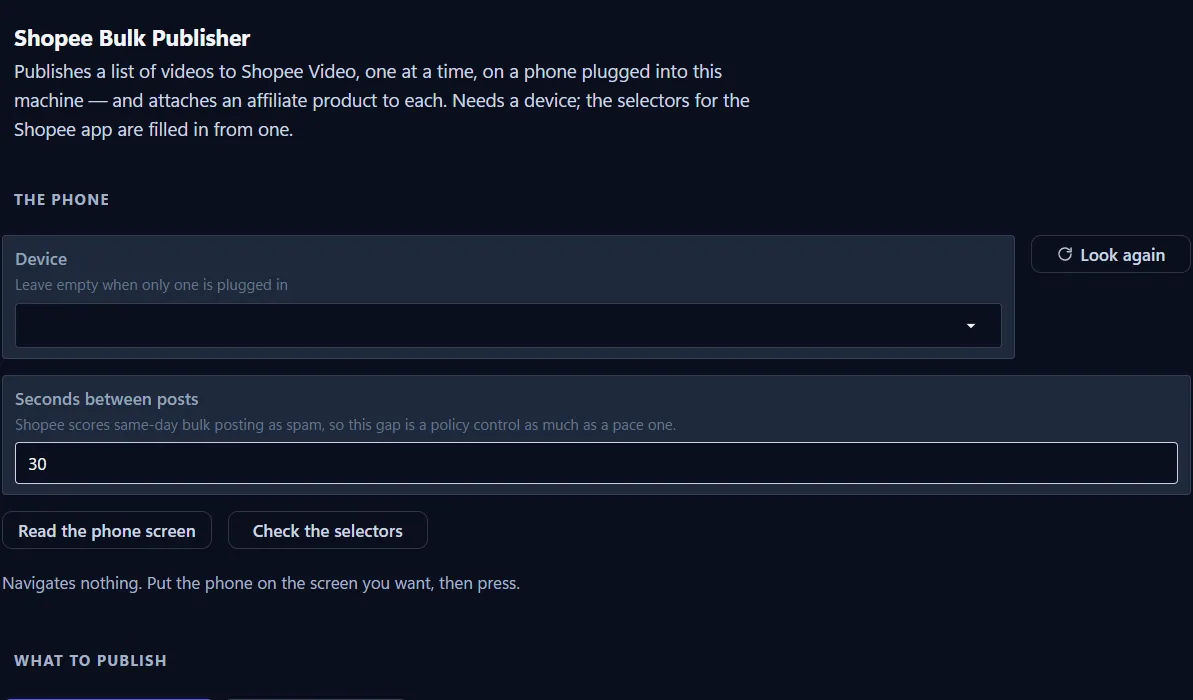
The phone is not optional
The Shopee screen posts to Shopee Video one video at a time by driving the Shopee app on an Android phone. There is no other route, so these have to be true before you press start:
- The phone is paired and connected — see Pairing an Android phone if it is not.
- The Shopee app is signed in on that phone.
- The video is 576p or larger. Shopee will not take anything smaller.
- The product link is a real product link, not a category or a shop.
The screen's Device box takes the phone — leave it empty when only one is plugged in — and Look again re-lists what adb can see. With no phone found it says so at once: No Android device is connected. Plug one in, or start the emulator, then press Look again.
Publishing a batch
-
Choose the phone and the gap
Pick the device in Device (press Look again if it is empty), then set the Seconds between posts. The default is already the safe number — read the section below before lowering it. -
Choose the kind of queue
The Many videos, one link tab is for a batch that all sells the same product; One link per video is for when each video sells something different. The counter below says how many videos the list holds. -
Paste the product link
On the one-link tab: paste into Product link for the whole batch, then press Copy the link to every row. The link is only what gets attached to the post — the AI that writes the caption does not read it. A row that needs its own link is edited straight into its Product link cell. A row with no product still posts; it just carries nothing. -
Write the caption
Paste one into Caption for the whole batch and press Copy the caption to every row, or let the AI write it: fill in Subject / product under Subject & instructions for the AI, press Write the caption with AI, read it and fix it. Write one per row takes that caption and says it a different way for each row. -
Add the videos
Choose videos from this computer for videos of your own, or Fill from the video library for the ones the app made. One video per row, edited in place. Tick the Delete column to mark a row you do not want posted this time — ticked rows are skipped and the app says how many. -
Press Start bulk publish
To stop: Stop — it stops after the video in flight. A row that failed can be fixed and retried with Retry failed instead of running the whole batch again.
data/logs/shopee/.The gap is a policy control
Posting a burst in one day is what Shopee scores as spam. It adds violation points: 12 points is a 30-day posting ban, 15 is permanent. The gap between posts exists for that reason, not for pacing — so it is something to leave alone rather than something to tune.
The screen says the same thing when the queue is empty: one video per batch is the safe pace.
When a post does not go up
Failures show up in the What happened column of the results table. These are the lines you are most likely to meet:
| What the Result column says | What it means |
|---|---|
| A batch is already running. | One batch at a time. Wait it out or press Stop |
| Add at least one video with a path. | No row holds a video yet. Press Choose videos from this computer or Fill from the video library |
| One post sits still at the video-picking step | The video is under 576p. Shopee refuses with a quick message AutoReel cannot read — the only sign is that the Tiếp theo button in the Shopee app sits there like a dead button |
| The video was copied across but is not in the gallery. The media scanner may not have finished. | The phone's gallery has not caught up with the file. Retry the failed ones a moment later |
| Shopee is asking for something done by hand (a sign-in, an OTP, or a check). … | The whole batch stops there. Do that thing on the phone, then run it again |
| The phone stopped answering in the middle of a video, so the batch was stopped and the rest were left unposted. … | The cable or the wifi dropped. Plug it back in, press Look again, then Retry failed |
| The product link could not be read. It has to be a Shopee product link, and this computer needs a signed-in session - … | A category link, or the Chrome window is not signed in to Shopee. When Shopee refuses the link the video still goes up, just with nothing attached — the only trace is that post's result.json |
| Publish was pressed but success could not be confirmed. Check the phone before running again — posting twice is a real possibility. | It is not certain the post went up. Look on the phone before pressing Retry failed |
| … selectors for the Shopee app have not been filled in yet, … | The selector table has not been taken from this phone. The batch will stop at its first step |
What next
If this screen cannot see a device, or the connection drops mid-batch, Pairing an Android phone is where that is fixed.