
Posting to Facebook
Posts go straight from your machine to the Page through the Graph API. No browser opens, no password is typed, no phone is involved.
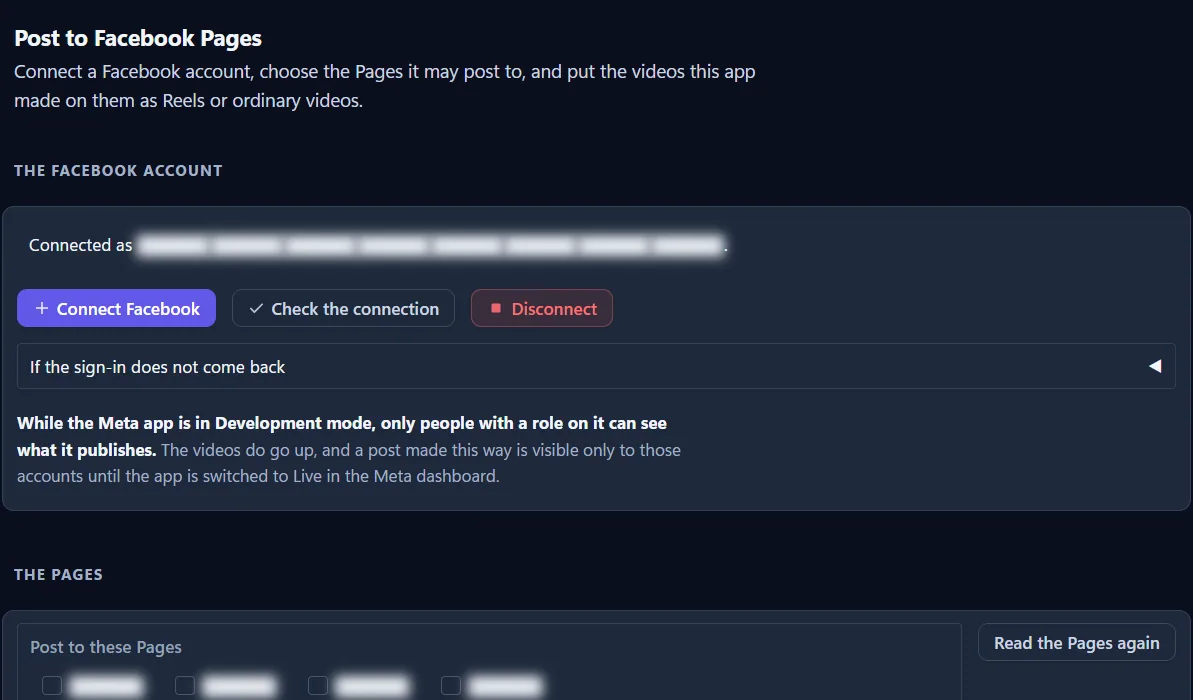
No browser, no phone
The Facebook screen posts videos to a Page through Meta's Graph API. That makes it the opposite of the Shopee screen: no phone is driven, no screen is tapped on your behalf, and there is nothing to sit and watch.
- A Facebook account that is an admin of the Page you want to post to.
- A Meta app of your own — see below. Three permissions and one redirect address, done once.
- Videos on this machine, or in the video library. No phone and no cable.
- A caption and a list of Pages — both chosen on this screen.
The Meta app — once
Posts go out through your Meta app, so the App Secret sits on your machine and is not sent anywhere else. Five steps, about ten minutes, and once per machine:
| Step | What you do |
|---|---|
| 1. Create a Meta app | At developers.facebook.com/apps, press Create app, name it anything. Note the App ID and App Secret under App Settings → Basic |
| 2. Add Facebook Login | Add the Facebook Login product for the Web platform |
| 3. Enable three permissions | pages_show_list (read the Pages you manage), pages_read_engagement (read Page details), pages_manage_posts (post videos to a Page) |
| 4. Register the return address | Fill in Valid OAuth Redirect URIs and App Domains exactly as the app shows them — including the trailing / |
| 5. Connect it to the app | Paste the App ID and App Secret on the Settings screen, go to the Facebook screen and press Connect Facebook, then paste the return address into The address, or just the code and press Finish connecting — within ten minutes |
Posting a batch
-
Check the connection
The group headed The Facebook account has to read Connected as …. With nothing there, press Connect Facebook; when an old connection breaks the app says so and the same button re-grants it. Check the connection asks again to be sure, and Disconnect removes it entirely. -
Tick the Pages
Under The Pages, tick them in Post to these Pages. With an empty list, press Read the Pages again. A Page this account cannot post to is left out, and the app says how many were. -
Write the caption
Paste one into Caption for every row and press Copy the caption to every row, or let the AI write it: fill in Subject / product under Subject & instructions for the AI, press Write the caption with AI, read it and fix it. Write one per row rewrites it as a different sentence per video. -
Add the videos
Choose videos from this computer, or Fill from the video library for the ones the app made. One video per row with its Video path and Caption; ticking the Delete column marks a row you do not want posted this time. -
Choose the kind and press Start posting
Post them as takes Decide per video, Always a Reel, or Always an ordinary video. Then press Start posting. A row that failed can be fixed and retried with Retry failed; Stop stops after the post in flight.
Every video goes to every Page you ticked. The video list has no Page column — the Pages are chosen once above, so 5 videos across 3 Pages is 15 posts. Between two posts there is a fixed 30-second gap with no control to change it: Facebook allows 30 Reels per Page per 24 hours, and the app warns beforehand when a run would go past that — it still runs, and the excess is what Facebook refuses.
data/logs/social/facebook/.When a post does not go up
| What the Result column says | What it means |
|---|---|
| No account is connected. Press Connect Facebook in the Account block. | Nothing is connected, or the connection was dropped. Press Connect Facebook |
| The sign-in has expired. Press Connect Facebook to grant access again. | The token expired. Connect Facebook fixes it — the Meta app does not need doing again |
| Access was revoked — you may have changed your Facebook password, or been removed from the Page. Grant access again and run on. | Changing your Facebook password also revokes the app. Grant access again and carry on |
| This account cannot post to that Page. It needs CREATE_CONTENT on the Page, and the Page has to be ticked when access is granted. | The account is not an admin, or that Page was not ticked while granting access |
| This account manages no Page, or no Page was ticked when access was granted. | Tick the Pages again during consent, then press Read the Pages again |
| Facebook does not take this format. It needs MP4 (H.264 or H.265). | The file is not a standard MP4. Render it again with the app |
| The video could not be read. The file may be damaged, or open in another program. | Close whatever holds the file, or use another one |
| Uploading to Facebook failed. The connection may have dropped part way. | The network dropped during the upload. Press Retry failed |
| Facebook took the file and could not finish with it. Try again, or try another video, to tell a bad file from a bad day. | Facebook accepted it and could not process it. Try again, or try another video, to tell a bad file from a bad day |
| Facebook is throttling: too many posts too fast. A Page takes 30 Reels in 24 hours. Wait, then retry the ones that failed. | Past 30 Reels per Page per 24 hours. Wait, then retry the failed ones |
| Facebook took the video but never confirmed the post went up. Open the Page and look before running again — it may already be live. | Open the Page first — retrying can post it twice |
What next
If the connection will not come up, or Meta says a permission is missing, Creating a Meta app walks it a step at a time — including the token route that needs no domain of your own.