
Shorts
This screen writes its own script from the topic you give it, reads it aloud, and cuts it over pictures and music taken from Assets.
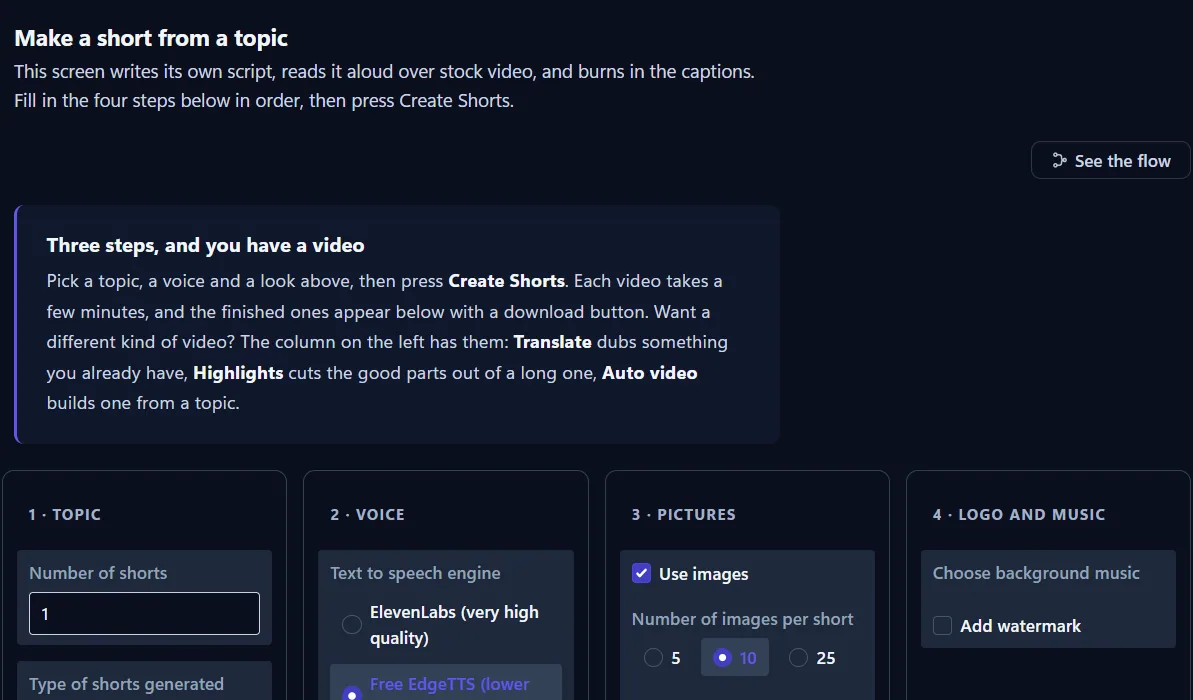
Before you press anything
The sidebar calls this screen Shorts; the page itself is headed Make a short from a topic. Same screen, and three things have to be in place first:
- An AI key, in Settings — the script is written by a model, so without one the run stops immediately.
- At least one background video in Assets.
- At least one background music track in Assets.
Four columns, filled in order
The screen is four columns, each with its heading printed at the top: 1 · Topic, 2 · Voice, 3 · Pictures, 4 · Logo and music.
-
Column 1 — how many, and what kind
Number of shorts sets how many this run makes. Type of shorts generated picks one of four: Reddit Story shorts, Historical Facts shorts, Scientific Facts shorts, Custom Facts shorts. Choosing Custom Facts brings up Write a subject for your facts (example: Football facts) underneath it — type the subject there. -
Column 2 — the voice
Pick an engine under Text to speech engine, then choose Language and Voice in the panel that appears. Preview reads a sample sentence aloud before you commit to a whole video. The two engines that run on this machine — ZeroTTS (on this machine, Vietnamese) and VieNeu TTS (on this machine, Vietnamese) — speak Vietnamese only, and each one downloads its model on the first video: about 1 GB and about 600 MB. -
Column 3 — the pictures
Tick Use images to cut stills in among the footage, then choose Number of images per short: 5, 10 or 25. Choose background video reads from Assets, and takes several at once. -
Column 4 — logo and music
Choose background music also reads from Assets. Tick Add watermark and type your channel name into Watermark (your channel name) to stamp it on the video. -
Press Create Shorts
Create Shorts sits under the four columns. While the run is going, the status line counts off each video and the step it is on.
Getting the videos back
Each video appears as it is finished, rather than all of them at the end.
-
One at a time
Every card has its own download button, which hands over that one video. -
The whole run
Download all packs every finished video of this run into one zip and your browser saves it. -
Clearing the screen
Clear the results takes the cards off the screen and nothing else — the files stay in the library.
The videos are also recorded in the Video library, under the kind Shortcut. Beside each one is a .txt file of the same name holding the YouTube title and description the model wrote for it — good to paste straight into the description box.
Send to Shopee and Send to Facebook hand this run's finished videos to those two screens, so posting them does not mean finding them again.
When it refuses to start
| What the app says | What it means |
|---|---|
| No AI key is set. Add one in the Config screen — the script is written by a model. | No AI key has been pasted. Paste one and run it again. |
| Select at least one background video. | Choose background video is empty — put something in Assets first. |
| Select at least one background music. | Choose background music is empty. |
| Write down your facts short's subject. | Custom Facts is selected and the subject box was left empty. |
| A watermark may only contain letters and numbers. | The channel name has accents or punctuation. A watermark takes letters and digits, 3 to 25 characters. |
| ElevenLabs is the chosen voice but its key is not set. Add it in the Config screen. | ElevenLabs uses its own key rather than the AI key. |