
Affiliate flow
Six steps run back to back from one press. You do not drive them one at a time — you watch the Progress column.
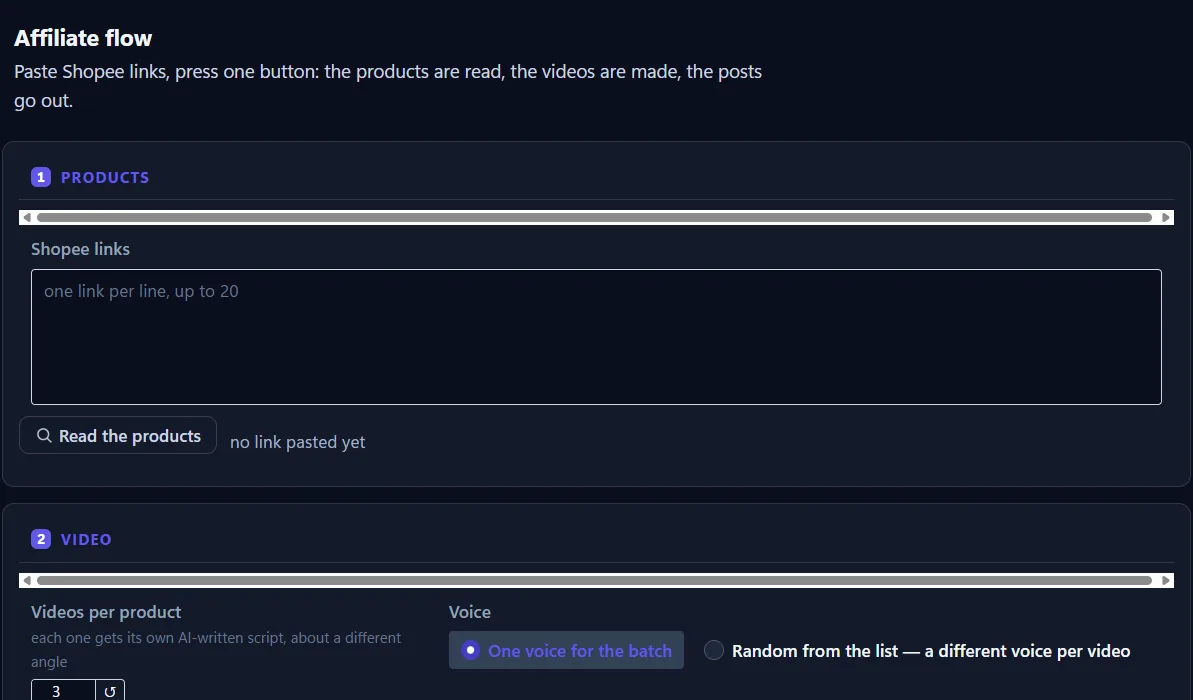
One press, six steps
The Affiliate flow screen runs the whole chain. Paste the links under Products, choose a few things under Video, tick where it goes under Publish — then press Start. Each step gets a line under Progress:
| Line under Progress | What it does |
|---|---|
| 1. Read the products | Opens each link and takes the name, the price and the pictures |
| 2. Download and sift the pictures | Downloads them and leaves out the too-small ones and the blank white ones |
| 3. Write the scripts | One script per video, written by the AI from a different angle each time |
| 4. Make the videos | Renders the pictures, the voice and the music into videos |
| 5. Fill the publishing queue | Hands the videos to the Shopee or Facebook screen, caption attached |
| 6. Publish | Actually posts them, on the screen holding that queue |
A step that falls short of its number turns red and the run stops there — it does not go back and make up the difference. Videos already rendered are still in the Video library.
Before you start
These are only needed if you use them, but each one stops the run somewhere in the middle:
- An AI key — for the scripting step. Without one the run stops before a single video is rendered.
- A signed-in Shopee Chrome window — step 1 reads the products through it. The Shop links page opens and signs it in.
- A paired phone — only if you tick Shopee under Publish.
- Facebook connected — only if you tick Facebook there.
- A song, or Background music set to None — with both empty the Start button refuses outright.
Ticking nothing under Publish is fine: "Tick nothing to make the videos without posting them." The videos sit in the Video library, and you can post them later from the Shopee or Facebook screen.
Running a batch
-
Paste the links into Shopee links
One link per line, at most 20 in a run. Press Read the products right there to learn which ones can be read before committing: the line under the box says how many were read out of how many. -
Choose Videos per product
Each video gets its own script and its own angle. A run makes at most 30 videos — past that the Start button refuses and tells you the total. -
Choose the voice, the frame and the music
Voice to read with has a Preview button beside it — listen before you choose. Frame ratio and Speaking speed apply to the whole batch. Background music: None, or Random / One song with a Song. -
Tick where it goes under Publish
Ticking Shopee means choosing the Phone (press Look for phones if the box is empty) and the Rest between posts (s) — 30 by default. Ticking Facebook means ticking the Pages to post to (press Read the Page list if it is empty) and choosing Post as. -
Press Start
The line above the button tells you the size of the run first: products, times videos per product, how many videos and roughly how many minutes. Fix it there if it is wrong. To cut it short: Stop.
The six lines under Progress run top to bottom. By the end of step 4 the videos are in the Video library; by the end of step 6 the queue over on Shopee or Facebook has finished posting.
Where it goes wrong
| What you see | What it means |
|---|---|
| A run is already going. Stop it first. | One run at a time. Let it finish, or press Stop, before starting another |
| The run stopped with an error: … | The error is quoted in full under Progress. Restarting the app also kills a run in flight — start again |
| No product had a usable picture, so there is nothing to make. | The listing's pictures are under 470×470, or they are blank white. Try another product |
| The model that writes the scripts is not answering (…), so the run stopped before any rendering. | The AI key, or the provider behind it. Nothing was rendered |
| not publishing — the videos are in the library | Nothing was ticked under Publish. The videos are fine — post them later from the Shopee or Facebook screen |
| … posted · … failed | Some posts did not go up. The screen holding that queue says which ones and why |
| Stopped. Videos already made are in the library; nothing was published. | Stop pressed partway: what was rendered survives, the posting never started |
What next
The Shop links screen in the same group is where a link is read on its own, and where you look at a product's pictures before a video is made from them.